All Email Login
- 4.0
- Rating
- 1.00M
- Installs
- Free
- Price
 Analysis by App-foxy
I approached All Email Login as a practical communication app rather than as a replacement for every dedicated email service. Its purpose is straightforward: bring access to multiple email accounts into one place, with a quick route back to your inbox after a phone call. That idea is useful for people who move between personal, work, school, and older accounts throughout the day, but convenience around email always needs to be judged alongside account control and privacy habits.
The app is free, belongs to the communication category, and is developed by All Email Login. It has built a sizeable audience, with over one million installs, a 4.0 average from around twelve thousand ratings, and roughly two thousand four hundred written reviews. Those figures suggest that the central idea works for many people, while also leaving room for a realistic question: is a single inbox doorway genuinely easier for you, or does it simply add another layer between you and the email providers you already use?
How the all-in-one approach feels in everyday use
The most appealing part is the reduction in switching. Instead of keeping several mail apps open or searching through a crowded home screen, I can treat this app as a central starting point. That is especially handy when I am checking several addresses in short bursts: a personal inbox for a delivery update, a work account for a document, and an older address for a confirmation message.
You May Also Like

 Blood Strike: 2.5 Anniversary
Blood Strike’s Loadouts Turn Every Drop Into a Tactical Gamble
A close look at Blood Strike’s custom loadouts: how fast access to signature weapons reshapes its battle royale rhythm, rewards preparation, and narrows the gap between fights.

 Pandora - Music & Podcasts
Pandora’s Music Is Easy to Start, but Harder to Recover
Pandora’s strength is its low-effort path from a seed to a station. Its weak spot is how much confidence it asks you to place in connection, setup, and quiet recovery.

 8 Ball Pool
 Is Built on Rivalries, Rematches, and Routine
A close look at the rivalries, rematches, shared routines, and unanswered safety questions that turn a quick pool match into a persistent mobile community.

 Samsung Music
’s Quiet Strength Is Playing What You Already Own
Its reach comes less from spectacle than from dependable access to a personal library. That simplicity is both the app’s strongest retention engine and its ceiling.

 AccuWeather: Weather Radar
AccuWeather Review: A Quick, Clear Forecast for Everyday Decisions
For everyday plans, the best forecast is the one you can understand quickly. AccuWeather makes rain timing, radar, and local conditions easy to act on, with a few trade-offs.

 Hill Climb Racing
Why Hill Climb Racing Still Turns Crashes Into One More Run
A tiny car, a bumpy hill and one more upgrade: Hill Climb Racing keeps resurfacing because its simple chaos makes every near-miss feel personal.
More From Our News Desk



The post-call idea is more specific and potentially more useful than it first sounds. Imagine finishing a call with a clinic, courier, school office, or client and needing to check for a follow-up message immediately. Returning to the home screen, locating a mail app, and choosing the correct account can be unnecessarily slow. A direct path into email makes sense in that moment, provided the app takes me to the account I actually intend to review rather than encouraging careless tapping.
I would not describe that workflow as a replacement for the full experience of a dedicated provider app. Gmail, Outlook, Yahoo Mail, and similar services are built around their own search, filtering, attachment handling, security settings, and account-specific notifications. A central login app is more attractive as a launch point and account switcher than as the only place where I manage important correspondence.
Who benefits most from this setup
This app makes the most sense for someone with several email addresses who values convenience over deep provider-specific tools. It can also suit a person who regularly forgets which app contains a particular account. Keeping the entry point consistent may reduce the small but repeated friction of finding the right inbox.
It is less compelling for someone who uses only one address, already has a reliable mail client, or needs advanced organization. If your daily work depends on detailed rules, specialized calendars, shared mailboxes, or carefully separated business and personal environments, a dedicated provider app will usually offer more control and a clearer connection to the service behind the account.
There is also a useful distinction between “all email in one app” and “all email in one account.” The former can simplify access, but it does not automatically make your accounts identical. Each provider still has its own identity, password, recovery process, folders, spam handling, and security expectations. I would use this app to reach those accounts, not as a reason to weaken the separation between them.
Trust begins with the sign-in moment
Email is unusually sensitive because it often contains password resets, receipts, private conversations, travel details, medical correspondence, and links to other services. For that reason, I pay close attention to what the app asks me to do when adding an account. The safest habit is to read every visible sign-in screen, verify which provider is being used, and avoid rushing through prompts simply because the app promises faster access.
A central access tool should not encourage me to hand over credentials casually. I would prefer a clear provider sign-in flow, recognizable account choices, and an obvious way to cancel before completing an addition. If a screen feels unexpected, asks for information that does not match the email provider, or makes the account destination unclear, I would stop and verify the process independently.
This is not a criticism of a particular hidden practice; it is a sensible rule for any app that sits close to email accounts. The visible choices matter. Before relying on the app, I would inspect the permissions shown by the operating system, review any privacy or data-use explanation presented in the app or store, and check whether the account can be removed without deleting the underlying mailbox. Those checks tell me more than a polished interface ever could.
Account separation is a practical safety feature
One of my strongest recommendations is to keep account identities mentally separate even when the app places them together. Give yourself a moment to confirm the sender address before replying, especially after a call when you may be moving quickly. Sending a personal message from a work address, or attaching a private file to the wrong account, is an easy mistake in any unified inbox workflow.
A simple routine helps. After opening mail from a call-related notification or shortcut, check the account name first, then the recipient, then any attachment. This takes only a few seconds and is more valuable than assuming the central app will always choose the right mailbox for the situation. Convenience should reduce navigation, not remove judgment.
I would also avoid adding every possible address just because the app makes consolidation attractive. An account that you rarely use may be better accessed directly when needed, particularly if it contains sensitive records or belongs to another person. Fewer connected accounts can mean fewer opportunities for confusion and a smaller surface to review when you change phones or reorganize your digital life.
What to check before making it your default
The app is free, which lowers the barrier to trying it, but free access should not replace careful evaluation. I would spend a few minutes looking at the account-management screens and identifying how clearly the app presents connected accounts. Can I tell which address is active? Is there a visible sign-out or removal choice? Does removing an account from the app appear separate from deleting the mailbox itself? These are basic questions, yet they strongly affect whether I feel in control.
I would also test the app with a low-risk account first rather than beginning with the mailbox that handles banking, work administration, or password recovery. That trial gives me a chance to understand the sign-in flow, account switching, and post-call behavior without making the first experiment unnecessarily sensitive.
Another worthwhile check is notification behavior. If the app surfaces mail after calls, I would review what appears on the lock screen and whether message previews are visible in places where other people might see them. A notification that merely says new mail is less revealing than one that exposes a subject line or sender. The right choice depends on your phone and surroundings, but the setting should be deliberate rather than accidental.
For shared spaces, this matters even more. Someone who uses a family tablet, a workplace phone, or a device that is occasionally handed to another person should be cautious about leaving several accounts available in one central app. A unified entry point can be convenient for the owner and overly revealing to anyone who gains access to the unlocked device.
How it compares with familiar alternatives
The usual alternative is to use each provider’s official app. That arrangement takes more space and may require more switching, but it often gives the clearest account-specific controls. If I need sophisticated search, provider-native spam tools, labels, folders, calendar integration, or detailed security settings, the official app is generally the better destination.
A general-purpose mail client is another option. It can offer one combined inbox while still providing a more mature set of sorting and composing tools. The trade-off is that these clients can feel busier, and their setup may be less approachable for someone who simply wants to reach several addresses quickly.
All Email Login sits closer to the convenience end of that spectrum. Its appeal is not that it transforms email management; it is that it can make the first step more consistent. I see value in that for quick checks, especially after a phone call. I would not choose it over a provider app solely because it gathers access in one place, and I would not assume that a unified screen delivers the same depth as a dedicated client.
Small workflows that make the app more useful
One effective workflow is to use it as a triage doorway. Open the relevant inbox, identify whether a message needs an immediate reply, and then move to the provider’s own app or web interface for complex work. This keeps the central app focused on quick awareness while reserving detailed actions for the environment designed around that account.
A second workflow is to check the account before composing rather than after. When several addresses are available, starting a reply from the message you are reading is safer than opening a blank compose window from a general screen and selecting an account from memory. That habit reduces the chance of sending from the wrong identity.
A third is to review connected accounts periodically. People change jobs, abandon old addresses, and lose access to temporary accounts. Removing an address that no longer belongs on the device keeps the app easier to understand and reduces clutter. I would do this after changing a password, replacing a phone, or handing a device to another household member.
Finally, I would treat the post-call shortcut as a prompt to verify context, not as an instruction to open everything immediately. A call may relate to one account while the most recent notification belongs to another. The shortcut saves time, but the user still needs to confirm which conversation is relevant.
Where the experience may become frustrating
The central concept can create ambiguity when several accounts receive similar messages. A quick glance may not be enough to distinguish personal, professional, and secondary addresses, especially when sender names repeat. That is a usability issue rather than a technical failure, but it affects real decisions. Clear account labels and a deliberate switching habit become essential.
There is also a risk of expecting one app to solve problems that belong to the email provider. If a message is delayed, marked as spam, blocked by a security challenge, or missing an attachment, the central app may not be the best place to investigate. I would go directly to the relevant provider before concluding that the message has disappeared.
People who depend on strict workplace policies should be particularly careful. A company may require its official mail application, device management, or a specific authentication method. In that setting, convenience is secondary to compliance and administrator-approved controls. The same applies to anyone whose email is tied to regulated records or highly confidential work.
The app runs on Android versions from 9 onward, and its current release is version 1.47. That makes it accessible to a broad range of Android phones, including older devices that may not support the newest operating-system features. Still, compatibility alone does not tell me whether an older phone will feel smooth, whether notifications will behave consistently, or whether battery-management settings will restrict background activity. I would test those practical details on the device I actually use.
My cautious recommendation
After looking at the app through the lens of convenience and control, I see a useful niche. It can be a sensible central doorway for people who juggle multiple email addresses and want a fast route to messages after calls. The free price makes a trial easy, and its communication-focused design is more approachable than a feature-heavy mail client for quick checks.
My recommendation comes with boundaries. I would start with a low-risk account, read each visible permission and sign-in choice, review notification previews, and confirm how account removal works. I would keep provider-specific apps available for important security changes, complex searches, sensitive attachments, and work that demands specialized controls.
The best reason to use All Email Login is reduced switching, not blind consolidation. If that distinction matches your needs, the app may become a convenient front door to your inboxes. If you need maximum provider control, strict workplace governance, or advanced mail organization, staying with official apps or choosing a full-featured mail client is likely the better decision.
For me, the app earns consideration because it addresses a real everyday annoyance without pretending that email accounts stop being separate services. Used carefully, it can shorten the path from a phone call to the message I need. Used thoughtlessly, any central access point can make account mix-ups and privacy oversights easier. That balance is the main thing to understand before making it part of your daily communication routine.
FAQs for All Email Login
01What features does All Email Login offer?
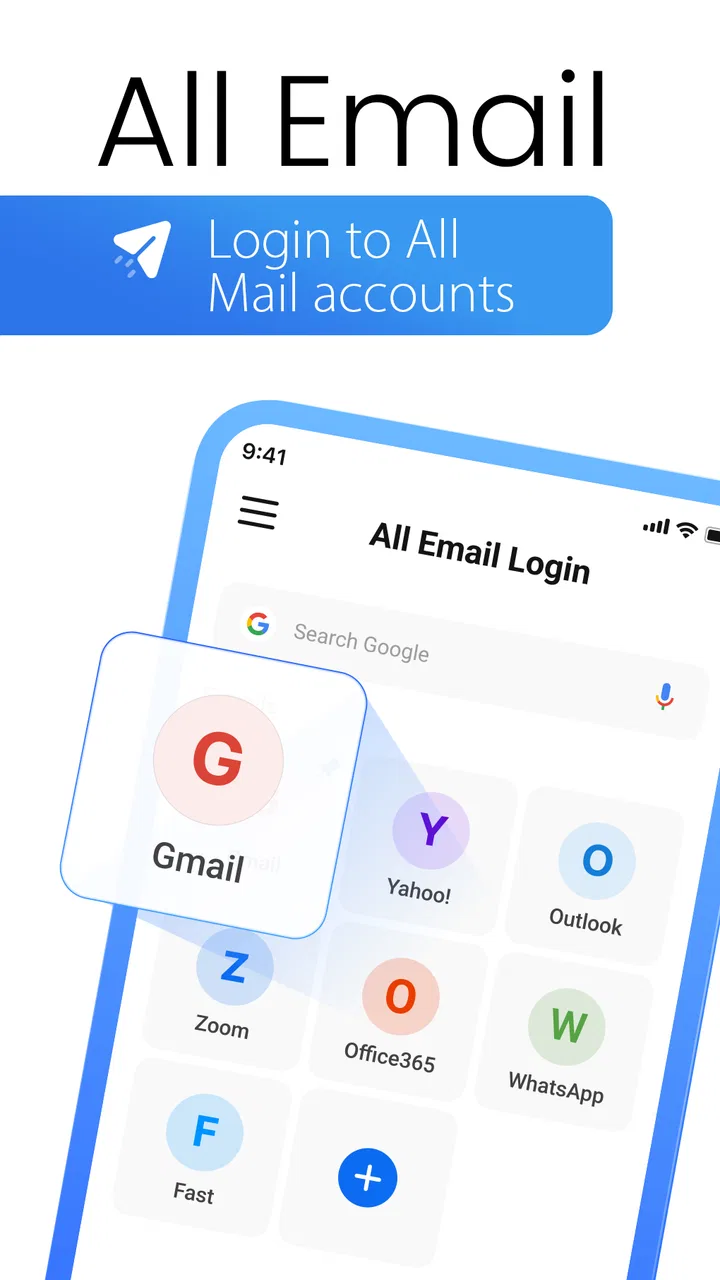
All Email Login provides a centralized platform for managing multiple email accounts seamlessly. Users can access and manage emails from various providers, such as Gmail, Yahoo, and Outlook, all in one place. The app also offers features like email notifications, customizable themes, and a user-friendly interface to enhance productivity.
02Is All Email Login secure to use?
Yes, All Email Login prioritizes user security. It uses encryption to protect your data and login credentials. Additionally, the app does not store your passwords, ensuring that your information remains confidential. Regular updates further enhance security by addressing any vulnerabilities.
03Can I customize notifications in All Email Login?
Absolutely! All Email Login allows users to customize how they receive notifications for incoming emails. You can set preferences for different accounts, such as notification sounds, vibration settings, and do-not-disturb periods, to ensure you only receive alerts when necessary.
04Does All Email Login support offline access?
Yes, the app offers offline access to your emails. You can read and draft emails without an internet connection, making it convenient for users who frequently travel or experience intermittent connectivity. Once back online, any drafts will be sent, and your inbox will sync.
05Is there a cost to use All Email Login?
All Email Login is available for free with basic features. However, there is a premium version offering additional functionalities such as ad-free usage, priority customer support, and advanced customization options. Users can choose based on their needs and preferences.
Pros
- Supports multiple email providers seamlessly.
- User-friendly interface for easy navigation.
- Customizable notifications for email alerts.
- Efficient email organization with folders.
- Quick setup process with guided steps.
Cons
- Lacks advanced email filtering options.
- Occasional sync delays with some providers.
- Limited integration with third-party apps.
- No dark mode option for low-light use.
- Ads can be intrusive in the free version.

All Email Login
Gallery